On Feburary 29th the PHP London 2008 conference will take place in London. Things have been very busy for the guys organising, there have been a few tweaks to the schedule but its looking like things are coming together nicely. I’m all set and have booked tickets and a hotel already – for Thursday *and* Friday nights so I can go both the pre-conference and post-conference socials, which is essential. If you haven’t booked your tickets yet, or you have to get your employer to do it, I suggest that’s something you might want to sort out fairly soon as I imagine it’ll be oversubscribed – in fact if everyone who has told me they are thinking of going does try to book tickets, I think they’ll sell out!!
At this event I will be busy with phpwomen, wearing my t-shirt and generally making a noise and raising the profile of the group. If you are attending the conference then you are morally obliged to pop over to us and say hello, we like to meet new people. If you are extra nice to us we may give you a t-shirt! There will be women from the UK and also elsewhere in Europe and it’ll be great to meet those I haven’t met yet and also see some old friends from other conferences. An excellent way to spend Leap Year Day in my opinion :)
Following on from my post about needing a new job, the observant among you may have noticed that I have yet to post the promised sequel about myself and my skills. That’s because I don’t need to – I have a job! I will soon start a job with IBuildings, an amazing and energetic set of people, and I’m wildly excited. They are based in London but I’ll be telecommuting most of the time.
Its been a funny few months, I’ve been very active in the PHP community, mostly because I’ve needed some professional support and they are a wonderful set of people. They have been graceful to accept my attempts to contribute to the community and have supported and encouraged me every step of the way. Through this I came to do a PHP|Abstract podcast, a talk at a BarCamp, quickly followed by being stalked and offered a job by a very good local-ish employer. I ended up passing on the opportunity because it was the kind of local that is too far and awkward to do in the rush hour for every day, however the experience was amazing and I met some great people in the process. I studied for and managed to pass my ZCE exam, and in the same week parted company with my employers of almost a year. In the last five days I have communicated with some superstars from my industry, looked over my shoulder to find the other lornajane that surely they are actually looking for, received two excellent job offers from two uber cool companies, and accepted one of those offers. I owe thanks to many, many people for the moral support, listening and general egging-on they supplied – guys, you know who you are.
After all that – I need a nice cup of tea and a sit down … :)
Recently I wrapped a class up and provided it as a SOAP service. Getting it working was a bit of a struggle and its clearly not something that people are doing a lot of, so here’s a quick roundup of the main issues and how I tackled each one.
Start Small – Build and Check A Class
I firstly built some unit tests using PHPUnit (more about that another day perhaps, but let me say it is excellent and I tumbled to it really easily once I’d started), then wrote my class and verified the tests were passing. This was to avoid trying to debug the PHP functionality through the added layer of the SOAP.
Simple SOAP Starting Point
My next step was to get a working SOAP service. This isn’t remotely tricky except that PHP can’t generate its own WSDL file (for extremely valid reasons but that doesn’t help me), so you either need to write it by hand or you need to generate it somehow.
As my starting point I took the whole working code from this fantastic example and checked that it worked for me.
SOAP setClass() and WSDL Fiddling
Having got this far I changed my SOAP server code to use the setClass() method and pointed it at my own original class. I then hand-edited the WSDL (one function at a time) to reflect the data types and arguments that would be moving through the service.
The actual service code looks like this:
require_once('lib/myClass.php');
ini_set("soap.wsdl_cache_enabled", "0");

$server = new SoapServer("service.wsdl");
$server->setClass("MyClass");
$server->handle();
The example WSDL supplied by the JimmyZ tutorial has a single function in it at the early stages, and I started with that, then adapted it for one single function from the class. This is perfectly valid providing you don’t try calling anything else! The PHP function declaration took this form:
function getAccountStatus($accountID)
The function returns two variables – it passes back the account ID and also returns information about the number of credits on the account. The accountID is a string of up to 8 characters, the other variable is a number. Here is the WSDL adapted for this purpose:
Once I discovered that WSDLs are best read from end to beginning, I was able to expand the example above for all the other various functions I needed.
Hopefully this helps someone get started. There are various tools available for generating the WSDL, in particular try either George’s suggestion, the offering from phpclasses.org, or check out the automatic generator in ZDE. Certainly there are tools available, but I didn’t manage to find one that did the trick for me.
If you are writing, or have written, a SOAP service in PHP5 then drop a comment and let me know – I certainly felt like I was in a minority on this project. Similarly if I’ve missed anything then I’d appreciate comments so I know for next time.
I’d like to announce that today I parted company with my employers Coolpink to the satisfaction (and probably benefit) of both sides.
To answer the first three questions: Yes, I am fine. Yes, they are paying me my notice period so I won’t starve. And yes, I need a new job! I’ll put up a coherent post on me and my skills soon.
Its exciting times at PHPWomen.org. There is the new addition of a “Donate” button, for anyone who would like to contribute to our cause. As if we aren’t reason enough, the adorable Cal Evans from Devzone has given us 10 elePHPants (remember he sent me one?) to give to the first ten people to donate more than $50.
PHPWomen finances goodies to give away at conferences and also assists members who perhaps would not ordinarily be able to attend conferences to get there and participate. More women at conferences …. can that be a bad thing?
After the fun I had last year at PHPLondon, I’m happy to announce that I’ll be there this year as well. The talks are pretty much finalised, the schedule is online and all that’s left is for everyone to get tickets and I’ll see you there!
For a few weeks now, I’ve been seeing this error in my logs every night:
/etc/cron.daily/logrotate:
error: error running shared postrotate script for /var/log/mysql.log /var/log/mysql/mysql.log /var/log/mysql/mysql-slow.log
run-parts: /etc/cron.daily/logrotate exited with return code 1
What’s happening is that after all the mysql backing up and everything is done, ubuntu is trying to use the debian-sys-maint user to flush the logs, this is actually called in /etc/logrotate.d/mysql-server. On my system, we seem to have lost this mysql user.
The solution is to look for the password used in the /etc/mysql/debian.cnf file, mine looks like this:
# Automatically generated for Debian scripts. DO NOT TOUCH!
[client]
host     = localhost
user     = debian-sys-maint
password = xxxxxxxxxxxxxxxx
socket   = /var/run/mysqld/mysqld.sock
[mysql_upgrade]
user     = debian-sys-maint
password = xxxxxxxxxxxxxxxx
socket   = /var/run/mysqld/mysqld.sock
basedir  = /usr
Using the password, and some inspiration from this post on the Ubuntu Forums I recreated the user with the necessary permissions and password with:
GRANT RELOAD, SHUTDOWN, PROCESS, SHOW DATABASES, SUPER, LOCK TABLES ON *.* TO 'debian-sys-maint'@'localhost' IDENTIFIED BY PASSWORD 'xxxxxxxxxxxxxxxx'
This did the trick, as the nightly errors have now disappeared from my script. Hope this helps someone in a similar situation – if you can expand these notes then please add a comment and I will update this as needed – thanks :)
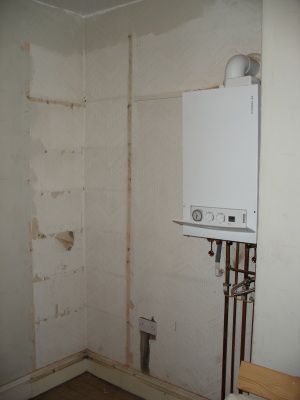
This weekend has been, like many before it, DIY-tastic. I popped out to a party this afternoon and in the meantime Kevin put the finishing touches to the shelves in the little bedroom that we will use as an office. To put this in context, let’s start with the “before” photo:
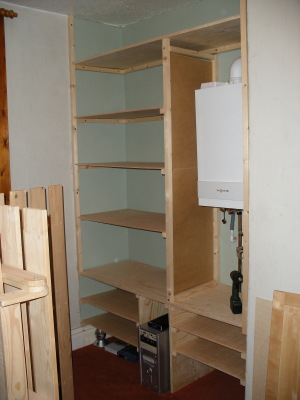
So here are the new shelves, finished today (the nice contrasting wall colour was the result of me popping to the DIY store and trying to guess which colour paint would be the closest match … I’ve already been assured there is something wrong with my colour sense!):
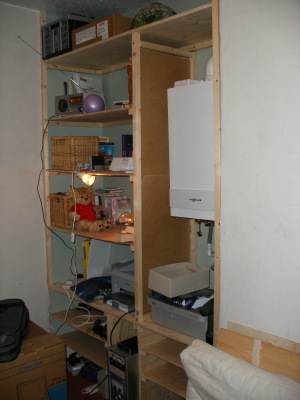
And here’s what they looked like an hour later, when I got some stuff unpacked onto them – they’re really deep shelves and they are going to hold a lot of “stuff” :)
I’d also like to give special mention to this guy:
I had a build-a-bear voucher for Christmas so I went and chose this traditional style bear. He is stuffed really hard, so although he isn’t cuddly, he is still soft and can sit up on his own. He’ll be supervising operations in the new office and keeping me company when I am working here. All in all, I think its coming together rather well – all I need now is some ideas for small-scale woodwork projects to take care of the many offcuts that are lying around downstairs. Suggestions in the comments box please …
I had cause this week to install an additional version of PHP onto my development server. This is because I wanted to look at the code for forkr which is targeted at PHP 5.3, which isn’t out yet. So I trotted across to snaps.php.net and downloaded the current version of PHP 5.3.
I then used the following steps to compile PHP:
./configure --prefix=/usr/local/php5.3 --with-apxs2=/usr/bin/apxs2
make
make test
make install
The configure arguments are to get the resulting code put into /usr/local/php5.3/ and to specify where to find apxs2 itself. Strictly speaking the “make test” step is optional, however as this is a development version of php I consider it polite to run this automated test and then press the button to submit the results at the end, it runs quickly and if it helps the QA people, then great.
It was at this point that I realised that I had overwritten a pre-existing file, critically it was /usr/lib/apache/modules/libphp5.so, the shared object file for my existing PHP installation! I fiddled with the PHP configuration at length but could not figure out how to get PHP to spit a differently named or located file out of the other end of the process.
This evening I mentioned my problem in the #phpc channel on freenode (warning, its not a help channel, don’t go there and ask questions, you won’t get a warm welcome) and after some prodding from the guys there I worked around my problem by skipping the make install step – its this step which uses apxs to move the file and causes my problem. The makefile shows the list of install targets, and I needed to exclude install-sapi. My steps now look like this:
./configure --prefix=/usr/local/php5.3 --with-apxs2=/usr/bin/apxs2
make
make test
make install-cli install-build install-headers install-programs install-pear
cp libs/libphp5.so /usr/lib/apache2/modules/libphp5-dev.so
The new make install line just installs the bits I’ll want, it seems that any combination of these can be used, depending on which bits of the language will be needed. The final line copies the apache module into the correct location for my system (Ubuntu Gutsy Gibbon).
Non-technical Postscript
I just wanted to add a note here to say that I would probably never have got to the bottom of this problem if I hadn’t been collectively rescued from it by some of the seriously leading lights in the PHP community – people who shouldn’t really know my name never mind stop to help me with a fairly basic problem. So thanks and hugs to Derick, Johannes, Davey and Ben. Thanks guys – for solving my problem *and* reminding me why the PHP Community is a cool place to be!