Acer Aspire One (and cosy)

I can’t remember another post which was in both the “tech” and “craft” categories – so no complaints from either camp please! Last week I became the new owner of an acer aspire one netbook/ultra mobile PC. Its little, blue, and very cute! If you want to skip the tech bit and read about the cosy I made, click here.

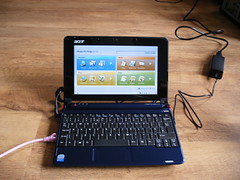
aspire startup screen

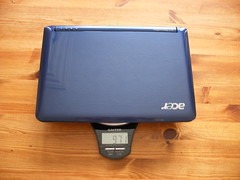
The hardware isn’t the best in its class, but it isn’t the most expensive machine either. It has 512MB RAM, 8GB hard drive (solid state drive), it measures 8.9 inches and weighs just 971g.

acer aspire on scales

The default OS for the linux version is something called “Linpus Lite”, which is a kind of toddler fedora as far as I can tell. I’m a long-term linux user and I found the locked-down-ness and the limited interface quite difficult to get started with. However with some help from this nice walkthrough plus some tips from the aspireoneuser.com forums I managed to get root access, turn on the xfce right-click menu and add a menu to the panel, install Opera and Skype and customise the main menu screens. Oh and have multiple desktops, which I like.

Its great for reading feeds, email, chat, and so on, and that’s probably all I’ll use it for. Since I often develop on a dev machine over vim + ssh, I might develop from this machine but I don’t think I’ll develop on it very often. I have already been tripped up by not having particular programs and not knowing what to use instead. Konqueror is leaving a big gap in my life, I do use it a lot. I haven’t done much with fedora before, I’m sure yum is great but it isn’t aptitude. Also the weird “the default user logs in automatically, needs no password, and has instant sudo rights” setup makes me twitch. We tried turning off the sudo rights but bits of the desktop stopped showing up so I’ve left that as is.

There are some definite disappointments. The multi card reader claims to read XD cards – this is a big selling point for me as I have reason to be on the road with camera and laptop soon and I have a fujipix camera which takes an XD card. Well, XD cards do not work with the acer aspire ones so far as I can tell. We’ve dug through the drivers and it looks like it just isn’t set up to do it at all. I’m logged a support email with Acer but no response just yet. I bought the machine through PC World which seems to reduce the amount of support Acer gives, which is a bit disappointing as I didn’t know that before I did it (nobody else seemed to have supply, and they are local if entirely unfriendly. I know I don’t look like a proper geeky business user, but that doesn’t mean you can ignore or patronise me). The wireless won’t resume if it was turned on and the machine hibernates, you have to turn off the wireless before you do that, which seems like a little niggle but when you have lots of tabs active and you have to reboot to get your connection back … its really annoying.

All in all, I would usually have waited for a second generation machine but this is cute, it seems pretty robust, and withouth being very expensive it does everything I need. And at less than 1 kg, I can actually carry it without getting shorter in the process, which is more than I can say for my laptop! There is online evidence of people successfully getting proper ubuntu installations onto these machines and I’m very tempted by that idea.

I have been busy installing the new toy, but I have also been busy making it a cosy!
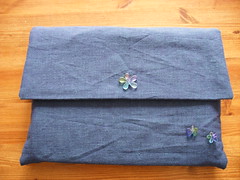
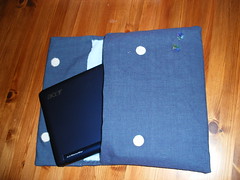
finished product, outside finished product, inside

Its canvas on the outside, microfibre cloth on the inside (its really shiny and gets fingerprint-y, its good to have the soft inside) and it has rigid panels (made from a plastic placemat that got too close to me while I was feeling inspired). I made two simple envelope-type bags, put them inside one another, and stitched the lining into the outer. The fastenings are sticky dots of velcro (which I shoudl have sewn in because it doesn’t stick well to fabric, oops), and the beads are ones I’ve had in my stash for … more than ten years, scarily enough. They were just waiting for this project! I made the case to be a loose fit, knowing that I’ll try to get A5 paper in there as well as the machine itself as its sort of a convenient size!

Crochet Tutorial: Foundation Ring

Following on from the last lesson, where we did crochet chain with yarn and a hook, this week we use the chain to create the basis for our first project.

It’ll start to look like something after the next one, promise :)

Getting Started with irssi

Irssi is a fabulous IRC client, which runs on the command line. I’m sure I don’t use half the features it offers but its very stable, unintrusive ( you can run it in a background terminal, or even leave it running in a detached screen process ), and frankly excellent. Because I don’t have to set up irssi very often, I always have to look up how to do it – here’s the quick start guide (and remember you can use any of the commands with a “help” argument to get instructions)

First of all, we create a network

/network add -nick  -user  

/network add -nick fred -user fred freenode

Next up, we add a server to the network – this step is so we can add a number of alternative servers for the same network, I never do though.

/server add -noauto -network  

/server add -noauto -network freenode irc.freenode.net

You can also use -auto rather than -noauto above to reconnect to this network every time you use irssi.

Finally, we connect.

/connect 

/connect freenode

PHPNW Site and Call for Papers Launched

Yay! The PHPNW site is now online with all the details of the PHP North West Conference to be held on November 22nd, 2008 in Manchester, UK. The conference is specific to PHP and aims to develop the skills of the developers in the local area. Look out for local speakers, some drinking, and generally a good crowd. Put the date in your diary, tickets will go on sale soon.

We’re also launching the call for papers for this event – it runs til 21st September and I’m really hoping we’ll see some good entries covering a wide range of topics. We are including some shorter slots as well as the traditional 1-hour presentations, so hopefully you can think of something you’d like to talk about for one of those units of time.

If you’ve got any comments or questions about the event, the talks, submitting a paper or anything else PHP-north-west-y, then add a comment or drop me a line.

Curl Cheat Sheet

I have a scribbled sheet on my desk, which is my “cheat sheet” for curl, its really short and I thought I’d put my notes here for safe-keeping. If you’re visiting, then I hope they help you too.

Continue reading

Six Months of Telecommuting

Although it seems impossible, I really have been in my “new” job for 6 months. The big change this time around is that my new role is based almost entirely from home – I’m a salaried, 40-hours-per-week, home worker. This post is about my experiences adapting to this change rather than the new job itself (its going rather nicely, thanks for asking!)

The first thing to say about telecommuting is that it isn’t for everyone – and the second thing to say is that I absolutely love it! I wasn’t expressly looking for a remote position, and there are definite downsides, but I find it really suits me nicely. Strangely I’m a really sociable person most of the time, and I go a bit crazy if I spend too long on my own, but working on my own is a revelation.

Workspace

With excellent timing, we finished turning one of the smaller bedrooms into an office just a few days before I started looking for a new job. It has lots of storage, more network and electricity than I know what to do with, and a nice view of my (completely overgrown) garden. It also has a door that shuts and a futon for visitors to sit on. I acquired the large desk out of the study bedroom I had as a teenager, and have a fabulous office chair to sit on.

Communications

The thing about working remotely is that it can be quite isolating. For quite a while now I’ve had more interaction with online friends than coworkers – and even when communicating with co-workers I have usually used IM. So to be physically elsewhere actually makes little difference except I don’t have to hear their music played too loud over headphones or someone typing really loudly. I like to interact with people and found it quite easy to get to know my new colleagues, although it took time to meet them all in real life. It is often difficult to ask for help, but I’m very good at it (ask any of my usual questioning targets) and I find everyone very sympathetic and helpful even when my problem is actually that I’m having a “blonde moment”. In a real office, I’d probably ask the person next to me to cast their eye over my code and spot the problem – and its actually not that tricky to do it with a physical divide. I use IRC, Skype, twitter and pastebin to interact with various people – coworkers and other techies.

Working Hours

I’m contracted to work a normal working week, and although I have flexi-time, so far I’m dodging the bullet of losing too many hours to working when work and home are the same place. Part of that is that I’m a morning person anyway, and I work for a Dutch company so I usually log in early my time and join in their morning greetings. I also have a social life which is adapted around working a 9-5 office job – so I’m out most evenings. Add into the mix a partner that does work those regular office hours most of the time and needs his dinner at the same time every day, and you can understand how I find it possible to work regular hours and still play hard as well. There are plenty of distractions around the home, chores to do and games to play, but I’m trying to stay in my regular pattern of working in the daytime and saving everything else for evenings and weekends. Being at home though does mean that lunchtimes can include a nap or a swift round of mario kart, and if I put my washing on the line I can go and rescue it if it rains!

I’ve skated over the downsides, the days where you don’t know what you’re doing and the person you’re trying to get hold of isn’t answering emails or phone calls. Or the days when things are going really wrong and its hard to know what other people are doing and who you might interrupt for help. All in all though, its all good, probably helped by having a job that is stimulating, and colleagues that are friendly. Having discussed this with a few different people, I am of the opinion that not everyone would experience this the same way have. But for now, life is good.

Crochet Cupcake

We have a whole raft of birthdays in the family at this time of year. My sister and my dad share a birthday, and theirs is today!! Happy birthday Dad, happy birthday little sister. In addition, my not-brother-in-law and my niece have birthdays in the next couple of days too so there’s lots of celebrating.

My sister is working abroad so I couldn’t bake her a cake this year – so instead I sent her this:
crochet cupcake

I made it from this pattern which was featured on craftzine, it was really quick to make! I just sewed the seed beads on as a little after thought, they look so cute though :)

Professional Development for Girl Geeks

Last night I gave a talk at the Leeds Girl Geek Dinners entitled “Professional Development for Girl Geeks” – and you can find the slides on slideshare if you’re interested.

Most of what I said wasn’t on the slides, but the gist of it was along the lines of:

  • Use the resources around you
  • People can be resources
  • Interact with resources
  • Ask Questions – do it well and ask each question once

I had a great night and I hope everyone enjoyed themselves as much as I did – and if you were there, are you asking questions yet?

Surfing Without a Mouse

I don’t use a mouse most of the time, because I have tendonitis in my forearms and find that I can use a keyboard for a whole working week without too much pain, whereas any mouse usage starts hurting badly in a day and half. As a web developer, I spend a lot of time with the Internet, developing on it, networking with it, reading on it, and so on – and I do it all without a mouse.

Spatial Navigation in Opera

The only browser I’ve ever managed to work with successfully is Opera, and most of my surfing uses the spatial navigation feature. Basically, you hold down shift, and use the arrows to jump around hyperlinks – much nicer than trying to tab around the place and getting stuck on some long list of links!

Keyboard Shortcuts

Opera has fabulous (and configurable) keyboard shortcuts. I could go on forever but my favourites are:
1 and 2 Next tab/previous tab
0 and 9 Make text bigger/smaller (its actually a zoom, so it works on pictures too)
6 Put the page back to the original size
Ctrl+t New tab
Ctrl+w Close tab
Ctrl+alt+z Open a tab that was closed, with all data still intact (I love this one!!)

With all of these put together, I can do pretty much everything.

Accessibility

The upshot of this is that I consider myself to have “accessibility requirements”. I don’t use a mouse, so I can’t click or mouseover. I use dropdown boxes by focussing and then arrowing down – so if yours triggers stuff at onchange, then I probably can’t use your site. I have javascript turned on most of the time, but plugins turned off (I can’t click on anything anyway) – and I regularly use Opera’s shortcuts for enabling/disabling CSS and images (ctrl+g and ctrl+i respectively) if I can’t see what’s going on. Opera also saves my preferences per site – so I can fiddle with settings for scripting and plugins on a per-site basis which is really helpful.

So there we go, if you have RSI problems, try using the ‘net from your keyboard. And if you thought “accessibility” went with “disabled”, think again.