Author Archives:
Crochet Cupcake
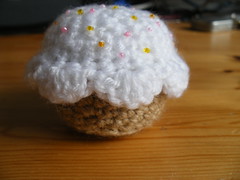
My sister is working abroad so I couldn’t bake her a cake this year – so instead I sent her this:

I made it from this pattern which was featured on craftzine, it was really quick to make! I just sewed the seed beads on as a little after thought, they look so cute though :)
Professional Development for Girl Geeks
Most of what I said wasn’t on the slides, but the gist of it was along the lines of:
- Use the resources around you
- People can be resources
- Interact with resources
- Ask Questions – do it well and ask each question once
I had a great night and I hope everyone enjoyed themselves as much as I did – and if you were there, are you asking questions yet?
Surfing Without a Mouse
Spatial Navigation in Opera
The only browser I’ve ever managed to work with successfully is Opera, and most of my surfing uses the spatial navigation feature. Basically, you hold down shift, and use the arrows to jump around hyperlinks – much nicer than trying to tab around the place and getting stuck on some long list of links!
Keyboard Shortcuts
Opera has fabulous (and configurable) keyboard shortcuts. I could go on forever but my favourites are:
1 and 2 Next tab/previous tab
0 and 9 Make text bigger/smaller (its actually a zoom, so it works on pictures too)
6 Put the page back to the original size
Ctrl+t New tab
Ctrl+w Close tab
Ctrl+alt+z Open a tab that was closed, with all data still intact (I love this one!!)
With all of these put together, I can do pretty much everything.
Accessibility
The upshot of this is that I consider myself to have “accessibility requirements”. I don’t use a mouse, so I can’t click or mouseover. I use dropdown boxes by focussing and then arrowing down – so if yours triggers stuff at onchange, then I probably can’t use your site. I have javascript turned on most of the time, but plugins turned off (I can’t click on anything anyway) – and I regularly use Opera’s shortcuts for enabling/disabling CSS and images (ctrl+g and ctrl+i respectively) if I can’t see what’s going on. Opera also saves my preferences per site – so I can fiddle with settings for scripting and plugins on a per-site basis which is really helpful.
So there we go, if you have RSI problems, try using the ‘net from your keyboard. And if you thought “accessibility” went with “disabled”, think again.
Daisy Unlocked on Mario Kart
When we first got the game, it seemed like I couldn’t play as my favourite character from the other Nintendo games, Princess Daisy. I grumbled a bit and played as peach instead, similar character but pink dress instead of yellow dress. It is actually way more than that of course – Peach is pink and blonde and a bit mainstream. Daisy is sassy and usually unsuitably dressed, I love her :) I looked round for reviews and discovered I could unlock Daisy – she’s in the Special Cup on 150cc.
Well, I’m not a brilliant gamer, but I really really wanted Daisy and off I went, time trialling each course to get myself up to speed, and then working through unlocking all the tracks on 50cc, 100cc, 150cc … along I went, taking more and more preparation and attempts each time, until finally I had the cup I needed. Except, its not that simple. You have to win that grand prix to get it, whereas you only need to be placed (1st, 2nd or 3rd) to unlock the next race. Well that was about 8 weeks ago.
I was coming 2nd in the cup pretty consistently but just couldn’t nail that top spot. I time trialled, tried to sort out manual sliding, played against the ghost data, and tried the cup over and over thinking that if I was lucky I’d do it, to the point where I’d pretty much stopped playing completely. And then, today, after a long sleep last night and Sunday Lunch in the pub, we had a quick game on Mario Kart and I beat Kevin on all 4 tracks … so I gave that special cup another shot – and won it!! So now, I finally have Daisy and shouting “come on Daisy” at the TV works so much better when it really is Daisy in the car :)
Crochet Tutorial: The Slip Knot
Here’s the first task, all you need is a bit of yarn, or string, or anything really.
Part 2 coming soon …
PHPNW 2008 – 22nd November
The event is aimed at people working with, or wanting to work with, PHP in the north of England. We’ll have a selection of sessions, with the technical content intended to be accessible to a whole range of audiences – it will also be multi-track so there’s sure to be plenty of material to interest you, whatever your background. We will be having a call for papers for the sessions, and we’re hoping that we’ll get some good submissions – particularly from senior developers around the area and the wider UK. Whether you’re hoping to speak, hoping to learn, looking for a good crowd to mingle with on a Saturday, or you just really like PHP geeks – put 22nd November in your diary and I hope I’ll see you there!!
If you have any questions, comments or suggestions about this event, just let me know (I’m not organising the whole thing but I’m helping!), either by leaving a comment or by contacting me directly.
Bubble Wrap Camera Case
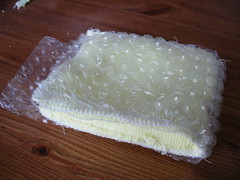
I started by making the inner microfibre liner with bubble wrap around it:
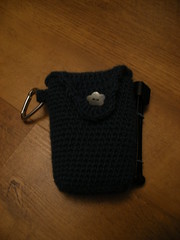
I then made the crochet outer, using some gorgeous dark turquoise wool I bought in Germany last year and which has been waiting for a project just like this one! Its quite fluffy but that doesn’t matter as the bag is lined. I added a button to close it, a carabiner to hang it from, and a place to hook the tripod onto if we are taking that too. Here’s the finished product – it looks a bit strange because its empty, since I was using the camera to take the photo!
(there are a few more photos on flickr )
Accessing Incoming PUT Data from PHP
PHP doesn’t have a built-in way to do this, and at first I was a little confused as to how I could reach this information. It turns out that this can be read from the incoming stream to PHP, php://input.
file_get_contents("php://input");
The above line provided me with a query string similar to what you might see on the URL with a GET request. key/value pairs separated by question marks. I was rescued from attempting to parse this monster with a regex by someone pointing out to me that parse_str() is intended for this purpose (seriously, I write a lot of PHP, I don’t know how I miss these things but its always fun when I do “discover” them) – it takes a query string and parses out the variables. Look out for a major health warning on str_parse() – by default it will create all the variables all over your local scope!! Pass in the second parameter though and it will put them in there as an associatvive array instead – I’d strongly recommend this approach and I’ve used it here with my $post_vars variable.
parse_str(file_get_contents("php://input"),$post_vars);
This loads the variable $post_vars with the associative array of variables just like you’d expect to see from a GET request.
Simple Example
Its a bit of a contrived example but it shows use of the REQUEST_METHOD setting from the $_SERVER variable to figure out when we need to grab the post vars. Firstly, here’s the script:
if($_SERVER['REQUEST_METHOD'] == 'GET') {
echo "this is a get request\n";
echo $_GET['fruit']." is the fruit\n";
echo "I want ".$_GET['quantity']." of them\n\n";
} elseif($_SERVER['REQUEST_METHOD'] == 'PUT') {
echo "this is a put request\n";
parse_str(file_get_contents("php://input"),$post_vars);
echo $post_vars['fruit']." is the fruit\n";
echo "I want ".$post_vars['quantity']." of them\n\n";
}
And here’s what happened when I request the same script using two different HTTP verbs. I’m using cURL to show the example simply because I think it shows it best.
Via GET:
curl "http://localhost/rest_fruit.php?quantity=2&fruit=plum"
this is a get request
plum is the fruit
I want 2 of them
Via PUT:
curl -X PUT http://localhost/rest_fruit.php -d fruit=orange -d quantity=4
this is a put request
orange is the fruit
I want 4 of them
Purists will tell me that I shouldn’t be returning data from a PUT request, and they’d be right! But this does show how to access the incoming variables and detect which verb was being used. If you’re going to write a REST service then the correct naming of resources and the correct response to each resource being accessed in various ways is really important, but its a story I’ll save for another day. If you use this, or perhaps you access the variables another way, then do post a comment – there aren’t a lot of resources available on this topic for PHP.

Flickr Plugin Weirdness
http://www.flickr.com/photos/64718621@N00/
which they obviously weren’t. I played around with this for a while, also trying my yahoo user id and getting nowhere.
Eventually I tried another flickr plugin on another site and got identical behaviour – at which point I logged a support ticket with Flickr to ask what I was doing wrong. It turns out that “username” in this case means this label here:

Never noticed that before, and its certainly not how I refer to myself, so I’m a bit confused – but hey my plugin is working! I hope this helps someone (probably me, next time I try to plug flickr in to something else) confused by flickr seeming to think you have the wrong username!